QUARTILE
Updated: 28 February 2011
Note: This documentation is for the SQL2008 (and later) version of this XLeratorDB function, it is not compatible with SQL Server 2005.
Click here for the SQL2005 version of the QUARTILE function
Use the aggregate function QUARTILE to return the quartile of a dataset. QUARTILE is equal to PERCENTILE(x, k*.25). For more information on how PERCENTILE is calculated, go to the PERCENTILE documentation. Syntax
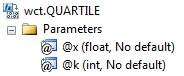
Arguments
@x
the values on which the quartile is to be calculated. @x is an expression of type float or of a type that can be implicitly converted to float.
@k
the quartile to be calculated. @k is an expression of type float or of a type that can be implicitly converted to float.
Return Types
float
Remarks
· If @k is less than zero or if @k is greater than four, QUARTILE returns an error.
· MIN, MEDIAN, and MAX return the same value as QUARTILE when @k is equal to zero, two and 4, respectively.
· If @k = 0, then QUARTILE returns the MIN of the dataset.
· If @k = 4, then QUARTILE returns the MAX of the dataset.
· If @k between 1 and 3, then QUARTILE returns the PERCENTILE of the dataset for @k * 0.25.
· @k must remain invariant for a group.
· PERCENTILE is an aggregate function and follows the same conventions as all other aggregate functions in SQL Server.
· If you have previously used the PERCENTILE scalar function, the PERCENTILE aggregate has a different syntax. The PERCENTILE scalar function is no longer available in XLeratorDB/statistics2008, though you can still use the scalar QUARTILE_q
· If there is only one value in the dataset, that value will be returned by the function.
Examples
In this example, we calculate the 3rd quartile for selected salary inforrmation collected from 10 cities.
SELECT wct.QUARTILE(
salary --@x
,3 --@k
) as QUARTILE
FROM (VALUES
('New York','429-00-6486',236503),
('New York','90-70-2526',224472),
('New York','87-85-0404',139802),
('New York','716-89-3089',185287),
('New York','159-78-5370',211900),
('New York','195-97-6820',186703),
('New York','95-49-2813',167451),
('New York','37-20-7422',149462),
('New York','44-48-0076',214708),
('New York','514-79-0041',226485),
('Los Angeles','526-34-4521',196402),
('Los Angeles','800-50-0868',205359),
('Los Angeles','41-34-3618',195679),
('Los Angeles','854-29-9398',131925),
('Los Angeles','673-30-3623',171091),
('Los Angeles','537-58-8889',110217),
('Los Angeles','808-68-4234',192836),
('Los Angeles','359-81-6735',209346),
('Los Angeles','731-80-2303',182186),
('Los Angeles','214-58-0842',125355),
('Chicago','456-79-9682',183698),
('Chicago','807-97-4784',194282),
('Chicago','981-16-3724',156083),
('Chicago','252-34-3054',226619),
('Chicago','613-28-9452',153366),
('Chicago','785-25-8628',205709),
('Chicago','451-26-7350',206085),
('Chicago','443-94-2401',120587),
('Chicago','696-26-8113',171185),
('Chicago','277-31-9760',211160),
('Dallas','537-88-7532',245231),
('Dallas','393-25-3503',238733),
('Dallas','612-17-0712',103152),
('Dallas','384-93-7285',228842),
('Dallas','745-10-7587',154749),
('Dallas','950-20-4045',102156),
('Dallas','477-48-7550',196533),
('Dallas','427-52-8597',238970),
('Dallas','891-19-0810',245204),
('Dallas','564-79-7612',196946),
('Boston','216-84-7134',128035),
('Boston','515-84-4073',249093),
('Boston','92-43-5775',205026),
('Boston','144-08-1092',198120),
('Boston','469-14-5012',174143),
('Boston','379-92-8313',166215),
('Boston','71-22-5132',105058),
('Boston','257-39-0324',107247),
('Boston','611-57-4279',118561),
('Boston','956-53-2865',232789),
('Denver','711-81-0072',240720),
('Denver','673-39-5028',159706),
('Denver','554-33-3980',232493),
('Denver','770-03-5304',203310),
('Denver','732-47-5077',123106),
('Denver','573-18-3567',149999),
('Denver','93-92-0334',162657),
('Denver','424-76-1468',116322),
('Denver','403-47-0063',246058),
('Denver','460-58-1833',198043),
('Miami','221-04-4153',130962),
('Miami','179-09-9839',227246),
('Miami','564-76-9437',144027),
('Miami','407-48-4081',138549),
('Miami','526-79-1840',208006),
('Miami','72-68-4977',170109),
('Miami','235-72-3903',191669),
('Miami','436-62-0474',161164),
('Miami','430-52-3914',162507),
('Miami','459-27-5541',238972),
('Phoenix','576-38-4531',238281),
('Phoenix','65-64-1278',197678),
('Phoenix','880-29-1997',159183),
('Phoenix','304-72-1881',194733),
('Phoenix','61-20-1046',221045),
('Phoenix','64-95-5514',105577),
('Phoenix','262-63-4021',186399),
('Phoenix','661-84-1023',234974),
('Phoenix','892-31-4821',115076),
('Phoenix','319-91-9463',239548),
('San Franciso','136-67-6873',148829),
('San Franciso','5-41-7374',114161),
('San Franciso','381-26-8852',232509),
('San Franciso','620-64-6243',112686),
('San Franciso','128-33-5550',208679),
('San Franciso','422-00-0156',107685),
('San Franciso','370-98-5607',133224),
('San Franciso','91-58-9543',218955),
('San Franciso','911-35-0448',187826),
('San Franciso','734-65-1268',223683),
('Atlanta','334-97-0585',240384),
('Atlanta','405-12-4222',124350),
('Atlanta','43-05-7567',233836),
('Atlanta','882-97-7996',134091),
('Atlanta','368-91-4292',173787),
('Atlanta','408-04-5921',140769),
('Atlanta','232-13-5280',206307),
('Atlanta','88-41-2584',118159),
('Atlanta','539-03-7548',116718),
('Atlanta','587-63-6935',174801)
)p(city, id, salary)
This produces the following result.
QUARTILE
----------------------
215769.75
(1 row(s) affected)
In this example we will calculate the 3rd quartile in each city.
SELECT city
,wct.QUARTILE(salary, 3) as QUARTILE
FROM (VALUES
('New York','429-00-6486',236503),
('New York','90-70-2526',224472),
('New York','87-85-0404',139802),
('New York','716-89-3089',185287),
('New York','159-78-5370',211900),
('New York','195-97-6820',186703),
('New York','95-49-2813',167451),
('New York','37-20-7422',149462),
('New York','44-48-0076',214708),
('New York','514-79-0041',226485),
('Los Angeles','526-34-4521',196402),
('Los Angeles','800-50-0868',205359),
('Los Angeles','41-34-3618',195679),
('Los Angeles','854-29-9398',131925),
('Los Angeles','673-30-3623',171091),
('Los Angeles','537-58-8889',110217),
('Los Angeles','808-68-4234',192836),
('Los Angeles','359-81-6735',209346),
('Los Angeles','731-80-2303',182186),
('Los Angeles','214-58-0842',125355),
('Chicago','456-79-9682',183698),
('Chicago','807-97-4784',194282),
('Chicago','981-16-3724',156083),
('Chicago','252-34-3054',226619),
('Chicago','613-28-9452',153366),
('Chicago','785-25-8628',205709),
('Chicago','451-26-7350',206085),
('Chicago','443-94-2401',120587),
('Chicago','696-26-8113',171185),
('Chicago','277-31-9760',211160),
('Dallas','537-88-7532',245231),
('Dallas','393-25-3503',238733),
('Dallas','612-17-0712',103152),
('Dallas','384-93-7285',228842),
('Dallas','745-10-7587',154749),
('Dallas','950-20-4045',102156),
('Dallas','477-48-7550',196533),
('Dallas','427-52-8597',238970),
('Dallas','891-19-0810',245204),
('Dallas','564-79-7612',196946),
('Boston','216-84-7134',128035),
('Boston','515-84-4073',249093),
('Boston','92-43-5775',205026),
('Boston','144-08-1092',198120),
('Boston','469-14-5012',174143),
('Boston','379-92-8313',166215),
('Boston','71-22-5132',105058),
('Boston','257-39-0324',107247),
('Boston','611-57-4279',118561),
('Boston','956-53-2865',232789),
('Denver','711-81-0072',240720),
('Denver','673-39-5028',159706),
('Denver','554-33-3980',232493),
('Denver','770-03-5304',203310),
('Denver','732-47-5077',123106),
('Denver','573-18-3567',149999),
('Denver','93-92-0334',162657),
('Denver','424-76-1468',116322),
('Denver','403-47-0063',246058),
('Denver','460-58-1833',198043),
('Miami','221-04-4153',130962),
('Miami','179-09-9839',227246),
('Miami','564-76-9437',144027),
('Miami','407-48-4081',138549),
('Miami','526-79-1840',208006),
('Miami','72-68-4977',170109),
('Miami','235-72-3903',191669),
('Miami','436-62-0474',161164),
('Miami','430-52-3914',162507),
('Miami','459-27-5541',238972),
('Phoenix','576-38-4531',238281),
('Phoenix','65-64-1278',197678),
('Phoenix','880-29-1997',159183),
('Phoenix','304-72-1881',194733),
('Phoenix','61-20-1046',221045),
('Phoenix','64-95-5514',105577),
('Phoenix','262-63-4021',186399),
('Phoenix','661-84-1023',234974),
('Phoenix','892-31-4821',115076),
('Phoenix','319-91-9463',239548),
('San Franciso','136-67-6873',148829),
('San Franciso','5-41-7374',114161),
('San Franciso','381-26-8852',232509),
('San Franciso','620-64-6243',112686),
('San Franciso','128-33-5550',208679),
('San Franciso','422-00-0156',107685),
('San Franciso','370-98-5607',133224),
('San Franciso','91-58-9543',218955),
('San Franciso','911-35-0448',187826),
('San Franciso','734-65-1268',223683),
('Atlanta','334-97-0585',240384),
('Atlanta','405-12-4222',124350),
('Atlanta','43-05-7567',233836),
('Atlanta','882-97-7996',134091),
('Atlanta','368-91-4292',173787),
('Atlanta','408-04-5921',140769),
('Atlanta','232-13-5280',206307),
('Atlanta','88-41-2584',118159),
('Atlanta','539-03-7548',116718),
('Atlanta','587-63-6935',174801)
)p(city, id, salary)
GROUP BY city
This produces the following result.
city QUARTILE
------------ ----------------------
Atlanta 198430.5
Boston 203299.5
Chicago 205991
Dallas 238910.75
Denver 225197.25
Los Angeles 196221.25
Miami 203921.75
New York 222031
Phoenix 231491.75
San Franciso 216386
(10 row(s) affected)
In this example, we will select all the cities where the 3rd quartile is greater than 225,000.
SELECT city
,wct.QUARTILE(salary, 3) as QUARTILE
FROM (VALUES
('New York','429-00-6486',236503),
('New York','90-70-2526',224472),
('New York','87-85-0404',139802),
('New York','716-89-3089',185287),
('New York','159-78-5370',211900),
('New York','195-97-6820',186703),
('New York','95-49-2813',167451),
('New York','37-20-7422',149462),
('New York','44-48-0076',214708),
('New York','514-79-0041',226485),
('Los Angeles','526-34-4521',196402),
('Los Angeles','800-50-0868',205359),
('Los Angeles','41-34-3618',195679),
('Los Angeles','854-29-9398',131925),
('Los Angeles','673-30-3623',171091),
('Los Angeles','537-58-8889',110217),
('Los Angeles','808-68-4234',192836),
('Los Angeles','359-81-6735',209346),
('Los Angeles','731-80-2303',182186),
('Los Angeles','214-58-0842',125355),
('Chicago','456-79-9682',183698),
('Chicago','807-97-4784',194282),
('Chicago','981-16-3724',156083),
('Chicago','252-34-3054',226619),
('Chicago','613-28-9452',153366),
('Chicago','785-25-8628',205709),
('Chicago','451-26-7350',206085),
('Chicago','443-94-2401',120587),
('Chicago','696-26-8113',171185),
('Chicago','277-31-9760',211160),
('Dallas','537-88-7532',245231),
('Dallas','393-25-3503',238733),
('Dallas','612-17-0712',103152),
('Dallas','384-93-7285',228842),
('Dallas','745-10-7587',154749),
('Dallas','950-20-4045',102156),
('Dallas','477-48-7550',196533),
('Dallas','427-52-8597',238970),
('Dallas','891-19-0810',245204),
('Dallas','564-79-7612',196946),
('Boston','216-84-7134',128035),
('Boston','515-84-4073',249093),
('Boston','92-43-5775',205026),
('Boston','144-08-1092',198120),
('Boston','469-14-5012',174143),
('Boston','379-92-8313',166215),
('Boston','71-22-5132',105058),
('Boston','257-39-0324',107247),
('Boston','611-57-4279',118561),
('Boston','956-53-2865',232789),
('Denver','711-81-0072',240720),
('Denver','673-39-5028',159706),
('Denver','554-33-3980',232493),
('Denver','770-03-5304',203310),
('Denver','732-47-5077',123106),
('Denver','573-18-3567',149999),
('Denver','93-92-0334',162657),
('Denver','424-76-1468',116322),
('Denver','403-47-0063',246058),
('Denver','460-58-1833',198043),
('Miami','221-04-4153',130962),
('Miami','179-09-9839',227246),
('Miami','564-76-9437',144027),
('Miami','407-48-4081',138549),
('Miami','526-79-1840',208006),
('Miami','72-68-4977',170109),
('Miami','235-72-3903',191669),
('Miami','436-62-0474',161164),
('Miami','430-52-3914',162507),
('Miami','459-27-5541',238972),
('Phoenix','576-38-4531',238281),
('Phoenix','65-64-1278',197678),
('Phoenix','880-29-1997',159183),
('Phoenix','304-72-1881',194733),
('Phoenix','61-20-1046',221045),
('Phoenix','64-95-5514',105577),
('Phoenix','262-63-4021',186399),
('Phoenix','661-84-1023',234974),
('Phoenix','892-31-4821',115076),
('Phoenix','319-91-9463',239548),
('San Franciso','136-67-6873',148829),
('San Franciso','5-41-7374',114161),
('San Franciso','381-26-8852',232509),
('San Franciso','620-64-6243',112686),
('San Franciso','128-33-5550',208679),
('San Franciso','422-00-0156',107685),
('San Franciso','370-98-5607',133224),
('San Franciso','91-58-9543',218955),
('San Franciso','911-35-0448',187826),
('San Franciso','734-65-1268',223683),
('Atlanta','334-97-0585',240384),
('Atlanta','405-12-4222',124350),
('Atlanta','43-05-7567',233836),
('Atlanta','882-97-7996',134091),
('Atlanta','368-91-4292',173787),
('Atlanta','408-04-5921',140769),
('Atlanta','232-13-5280',206307),
('Atlanta','88-41-2584',118159),
('Atlanta','539-03-7548',116718),
('Atlanta','587-63-6935',174801)
)p(city, id, salary)
GROUP BY city
HAVING wct.QUARTILE(salary, 3) > 225000
This produces the following result.
city QUARTILE
------------ ----------------------
Dallas 238910.75
Denver 225197.25
Phoenix 231491.75
(3 row(s) affected)
In this example we calculate the first quartile for a variety of data groupings, including one NULL value and a GROUP that only contains one member.
SELECT dsc
,wct.QUARTILE(x, 1) as QUARTILE
FROM (VALUES
('ABC', 15),('ABC',20),('ABC',35),('ABC',40),('ABC',50),
('DEF', 7),('DEF',10),('DEF',17),('DEF',20),('DEF',25),('DEF',70),
('GHI', 21),('DEF',28),('DEF',NULL),('DEF',38),('DEF',31),('DEF',52),
('JKL', 37)
) p(dsc, x)
GROUP BY dsc
This produces the following result.
dsc QUARTILE
---- ----------------------
ABC 20
DEF 17.75
GHI 21
JKL 37
(4 row(s) affected)