PERCENTRANK
Updated: 28 February 2011
Syntax
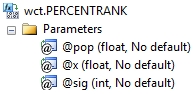
Arguments
@pop
the population values to be used in the PERCENTRANK calculation. @pop is an expression of type float or of a type that can be implicitly converted to float.
@x
is the value for which you want to know the rank. @x is an expression of type float or of a type that can be implicitly converted to float.
@sig
is a value that identifies the number of significant digits for the returned percentage value. If @Sig is NULL, PERCENTRANK uses three digits (0.xxx). @sig is an expression of type float or of a type that can be implicitly converted to float.
Return Types
float
Remarks
· If @sig is less than 0 or greater than 15, then 3 significant digits are returned.
· If @x does not match one of the values in the dataset, PERCENTRANK interpolates to determine the correct percentage rank.
· PERCENTRANK is the equivalent of the PERCENTRANK and PERCENTRANK.INC function in EXCEL. For PERCENTRANK. EXC see PERCENTRANK_EXC.
· @x must be invariant within a GROUP.
· @sig must be invariant within a GROUP.
· PERCENTRANK is an aggregate function and follows the same conventions as all other aggregate functions in SQL Server.
· If there is only one value in the dataset and it is equal to @x, the value 1 will be returned by the function. If it does not match @x then NULL is returned.
Examples
In this example, we want to see what percent rank a salary of 225,000 has in some selected salaray information for 10 cities.
SELECT wct.PERCENTRANK(
salary --@pop
,225000 --@x
,NULL --@sig
) as PERCENTRANK
FROM (VALUES
('New York','429-00-6486',236503),
('New York','90-70-2526',224472),
('New York','87-85-0404',139802),
('New York','716-89-3089',185287),
('New York','159-78-5370',211900),
('New York','195-97-6820',186703),
('New York','95-49-2813',167451),
('New York','37-20-7422',149462),
('New York','44-48-0076',214708),
('New York','514-79-0041',226485),
('Los Angeles','526-34-4521',196402),
('Los Angeles','800-50-0868',205359),
('Los Angeles','41-34-3618',195679),
('Los Angeles','854-29-9398',131925),
('Los Angeles','673-30-3623',171091),
('Los Angeles','537-58-8889',110217),
('Los Angeles','808-68-4234',192836),
('Los Angeles','359-81-6735',209346),
('Los Angeles','731-80-2303',182186),
('Los Angeles','214-58-0842',125355),
('Chicago','456-79-9682',183698),
('Chicago','807-97-4784',194282),
('Chicago','981-16-3724',156083),
('Chicago','252-34-3054',226619),
('Chicago','613-28-9452',153366),
('Chicago','785-25-8628',205709),
('Chicago','451-26-7350',206085),
('Chicago','443-94-2401',120587),
('Chicago','696-26-8113',171185),
('Chicago','277-31-9760',211160),
('Dallas','537-88-7532',245231),
('Dallas','393-25-3503',238733),
('Dallas','612-17-0712',103152),
('Dallas','384-93-7285',228842),
('Dallas','745-10-7587',154749),
('Dallas','950-20-4045',102156),
('Dallas','477-48-7550',196533),
('Dallas','427-52-8597',238970),
('Dallas','891-19-0810',245204),
('Dallas','564-79-7612',196946),
('Boston','216-84-7134',128035),
('Boston','515-84-4073',249093),
('Boston','92-43-5775',205026),
('Boston','144-08-1092',198120),
('Boston','469-14-5012',174143),
('Boston','379-92-8313',166215),
('Boston','71-22-5132',105058),
('Boston','257-39-0324',107247),
('Boston','611-57-4279',118561),
('Boston','956-53-2865',232789),
('Denver','711-81-0072',240720),
('Denver','673-39-5028',159706),
('Denver','554-33-3980',232493),
('Denver','770-03-5304',203310),
('Denver','732-47-5077',123106),
('Denver','573-18-3567',149999),
('Denver','93-92-0334',162657),
('Denver','424-76-1468',116322),
('Denver','403-47-0063',246058),
('Denver','460-58-1833',198043),
('Miami','221-04-4153',130962),
('Miami','179-09-9839',227246),
('Miami','564-76-9437',144027),
('Miami','407-48-4081',138549),
('Miami','526-79-1840',208006),
('Miami','72-68-4977',170109),
('Miami','235-72-3903',191669),
('Miami','436-62-0474',161164),
('Miami','430-52-3914',162507),
('Miami','459-27-5541',238972),
('Phoenix','576-38-4531',238281),
('Phoenix','65-64-1278',197678),
('Phoenix','880-29-1997',159183),
('Phoenix','304-72-1881',194733),
('Phoenix','61-20-1046',221045),
('Phoenix','64-95-5514',105577),
('Phoenix','262-63-4021',186399),
('Phoenix','661-84-1023',234974),
('Phoenix','892-31-4821',115076),
('Phoenix','319-91-9463',239548),
('San Franciso','136-67-6873',148829),
('San Franciso','5-41-7374',114161),
('San Franciso','381-26-8852',232509),
('San Franciso','620-64-6243',112686),
('San Franciso','128-33-5550',208679),
('San Franciso','422-00-0156',107685),
('San Franciso','370-98-5607',133224),
('San Franciso','91-58-9543',218955),
('San Franciso','911-35-0448',187826),
('San Franciso','734-65-1268',223683),
('Atlanta','334-97-0585',240384),
('Atlanta','405-12-4222',124350),
('Atlanta','43-05-7567',233836),
('Atlanta','882-97-7996',134091),
('Atlanta','368-91-4292',173787),
('Atlanta','408-04-5921',140769),
('Atlanta','232-13-5280',206307),
('Atlanta','88-41-2584',118159),
('Atlanta','539-03-7548',116718),
('Atlanta','587-63-6935',174801)
)p(city, id, salary)
This produces the following result.
PERCENTRANK
----------------------
0.79
(1 row(s) affected)
In this example we will see where 225,000 ranks in each city.
SELECT city
,wct.PERCENTRANK(salary, 225000, NULL) as PERCENTRANK
FROM (VALUES
('New York','429-00-6486',236503),
('New York','90-70-2526',224472),
('New York','87-85-0404',139802),
('New York','716-89-3089',185287),
('New York','159-78-5370',211900),
('New York','195-97-6820',186703),
('New York','95-49-2813',167451),
('New York','37-20-7422',149462),
('New York','44-48-0076',214708),
('New York','514-79-0041',226485),
('Los Angeles','526-34-4521',196402),
('Los Angeles','800-50-0868',205359),
('Los Angeles','41-34-3618',195679),
('Los Angeles','854-29-9398',131925),
('Los Angeles','673-30-3623',171091),
('Los Angeles','537-58-8889',110217),
('Los Angeles','808-68-4234',192836),
('Los Angeles','359-81-6735',209346),
('Los Angeles','731-80-2303',182186),
('Los Angeles','214-58-0842',125355),
('Chicago','456-79-9682',183698),
('Chicago','807-97-4784',194282),
('Chicago','981-16-3724',156083),
('Chicago','252-34-3054',226619),
('Chicago','613-28-9452',153366),
('Chicago','785-25-8628',205709),
('Chicago','451-26-7350',206085),
('Chicago','443-94-2401',120587),
('Chicago','696-26-8113',171185),
('Chicago','277-31-9760',211160),
('Dallas','537-88-7532',245231),
('Dallas','393-25-3503',238733),
('Dallas','612-17-0712',103152),
('Dallas','384-93-7285',228842),
('Dallas','745-10-7587',154749),
('Dallas','950-20-4045',102156),
('Dallas','477-48-7550',196533),
('Dallas','427-52-8597',238970),
('Dallas','891-19-0810',245204),
('Dallas','564-79-7612',196946),
('Boston','216-84-7134',128035),
('Boston','515-84-4073',249093),
('Boston','92-43-5775',205026),
('Boston','144-08-1092',198120),
('Boston','469-14-5012',174143),
('Boston','379-92-8313',166215),
('Boston','71-22-5132',105058),
('Boston','257-39-0324',107247),
('Boston','611-57-4279',118561),
('Boston','956-53-2865',232789),
('Denver','711-81-0072',240720),
('Denver','673-39-5028',159706),
('Denver','554-33-3980',232493),
('Denver','770-03-5304',203310),
('Denver','732-47-5077',123106),
('Denver','573-18-3567',149999),
('Denver','93-92-0334',162657),
('Denver','424-76-1468',116322),
('Denver','403-47-0063',246058),
('Denver','460-58-1833',198043),
('Miami','221-04-4153',130962),
('Miami','179-09-9839',227246),
('Miami','564-76-9437',144027),
('Miami','407-48-4081',138549),
('Miami','526-79-1840',208006),
('Miami','72-68-4977',170109),
('Miami','235-72-3903',191669),
('Miami','436-62-0474',161164),
('Miami','430-52-3914',162507),
('Miami','459-27-5541',238972),
('Phoenix','576-38-4531',238281),
('Phoenix','65-64-1278',197678),
('Phoenix','880-29-1997',159183),
('Phoenix','304-72-1881',194733),
('Phoenix','61-20-1046',221045),
('Phoenix','64-95-5514',105577),
('Phoenix','262-63-4021',186399),
('Phoenix','661-84-1023',234974),
('Phoenix','892-31-4821',115076),
('Phoenix','319-91-9463',239548),
('San Franciso','136-67-6873',148829),
('San Franciso','5-41-7374',114161),
('San Franciso','381-26-8852',232509),
('San Franciso','620-64-6243',112686),
('San Franciso','128-33-5550',208679),
('San Franciso','422-00-0156',107685),
('San Franciso','370-98-5607',133224),
('San Franciso','91-58-9543',218955),
('San Franciso','911-35-0448',187826),
('San Franciso','734-65-1268',223683),
('Atlanta','334-97-0585',240384),
('Atlanta','405-12-4222',124350),
('Atlanta','43-05-7567',233836),
('Atlanta','882-97-7996',134091),
('Atlanta','368-91-4292',173787),
('Atlanta','408-04-5921',140769),
('Atlanta','232-13-5280',206307),
('Atlanta','88-41-2584',118159),
('Atlanta','539-03-7548',116718),
('Atlanta','587-63-6935',174801)
)p(city, id, salary)
GROUP BY city
This produces the following result. Note that Los Angeles returns a NULL value, because 225,000 is greater than the maximum value for Los Angeles.
city PERCENTRANK
------------ ----------------------
Atlanta 0.853
Boston 0.857
Chicago 0.988
Dallas 0.542
Denver 0.749
Los Angeles NULL
Miami 0.875
New York 0.806
Phoenix 0.698
San Franciso 0.905
(10 row(s) affected)
In this example, we will only select those cities where the percent rank for 225000 is less than .90
SELECT city
,wct.PERCENTRANK(salary, 225000, NULL) as PERCENTRANK
FROM (VALUES
('New York','429-00-6486',236503),
('New York','90-70-2526',224472),
('New York','87-85-0404',139802),
('New York','716-89-3089',185287),
('New York','159-78-5370',211900),
('New York','195-97-6820',186703),
('New York','95-49-2813',167451),
('New York','37-20-7422',149462),
('New York','44-48-0076',214708),
('New York','514-79-0041',226485),
('Los Angeles','526-34-4521',196402),
('Los Angeles','800-50-0868',205359),
('Los Angeles','41-34-3618',195679),
('Los Angeles','854-29-9398',131925),
('Los Angeles','673-30-3623',171091),
('Los Angeles','537-58-8889',110217),
('Los Angeles','808-68-4234',192836),
('Los Angeles','359-81-6735',209346),
('Los Angeles','731-80-2303',182186),
('Los Angeles','214-58-0842',125355),
('Chicago','456-79-9682',183698),
('Chicago','807-97-4784',194282),
('Chicago','981-16-3724',156083),
('Chicago','252-34-3054',226619),
('Chicago','613-28-9452',153366),
('Chicago','785-25-8628',205709),
('Chicago','451-26-7350',206085),
('Chicago','443-94-2401',120587),
('Chicago','696-26-8113',171185),
('Chicago','277-31-9760',211160),
('Dallas','537-88-7532',245231),
('Dallas','393-25-3503',238733),
('Dallas','612-17-0712',103152),
('Dallas','384-93-7285',228842),
('Dallas','745-10-7587',154749),
('Dallas','950-20-4045',102156),
('Dallas','477-48-7550',196533),
('Dallas','427-52-8597',238970),
('Dallas','891-19-0810',245204),
('Dallas','564-79-7612',196946),
('Boston','216-84-7134',128035),
('Boston','515-84-4073',249093),
('Boston','92-43-5775',205026),
('Boston','144-08-1092',198120),
('Boston','469-14-5012',174143),
('Boston','379-92-8313',166215),
('Boston','71-22-5132',105058),
('Boston','257-39-0324',107247),
('Boston','611-57-4279',118561),
('Boston','956-53-2865',232789),
('Denver','711-81-0072',240720),
('Denver','673-39-5028',159706),
('Denver','554-33-3980',232493),
('Denver','770-03-5304',203310),
('Denver','732-47-5077',123106),
('Denver','573-18-3567',149999),
('Denver','93-92-0334',162657),
('Denver','424-76-1468',116322),
('Denver','403-47-0063',246058),
('Denver','460-58-1833',198043),
('Miami','221-04-4153',130962),
('Miami','179-09-9839',227246),
('Miami','564-76-9437',144027),
('Miami','407-48-4081',138549),
('Miami','526-79-1840',208006),
('Miami','72-68-4977',170109),
('Miami','235-72-3903',191669),
('Miami','436-62-0474',161164),
('Miami','430-52-3914',162507),
('Miami','459-27-5541',238972),
('Phoenix','576-38-4531',238281),
('Phoenix','65-64-1278',197678),
('Phoenix','880-29-1997',159183),
('Phoenix','304-72-1881',194733),
('Phoenix','61-20-1046',221045),
('Phoenix','64-95-5514',105577),
('Phoenix','262-63-4021',186399),
('Phoenix','661-84-1023',234974),
('Phoenix','892-31-4821',115076),
('Phoenix','319-91-9463',239548),
('San Franciso','136-67-6873',148829),
('San Franciso','5-41-7374',114161),
('San Franciso','381-26-8852',232509),
('San Franciso','620-64-6243',112686),
('San Franciso','128-33-5550',208679),
('San Franciso','422-00-0156',107685),
('San Franciso','370-98-5607',133224),
('San Franciso','91-58-9543',218955),
('San Franciso','911-35-0448',187826),
('San Franciso','734-65-1268',223683),
('Atlanta','334-97-0585',240384),
('Atlanta','405-12-4222',124350),
('Atlanta','43-05-7567',233836),
('Atlanta','882-97-7996',134091),
('Atlanta','368-91-4292',173787),
('Atlanta','408-04-5921',140769),
('Atlanta','232-13-5280',206307),
('Atlanta','88-41-2584',118159),
('Atlanta','539-03-7548',116718),
('Atlanta','587-63-6935',174801)
)p(city, id, salary)
GROUP BY city
HAVING wct.PERCENTRANK(salary, 225000, NULL) < .90
This produces the following result.
city PERCENTRANK
------------ ----------------------
Atlanta 0.853
Boston 0.857
Dallas 0.542
Denver 0.749
Miami 0.875
New York 0.806
Phoenix 0.698
(7 row(s) affected)
See Also