LARGE
Updated: 28 February 2011
Note: This documentation is for the SQL2008 (and later) version of this XLeratorDB function, it is not compatible with SQL Server 2005.
Click here for the SQL2005 version of the LARGE function
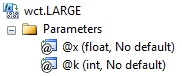
Use the aggregate function LARGE to calculate the kth largest value in a dataset. Use this function to return a value based on its relative standing.Syntax
Arguments
@Known_x
the input values for the function. @Known_x is an expression of type float or of a type that can be implicitly converted to float.
@K
is the position (from the largest) in the dataset to return. @K is an expression of type float or of a type that can be implicitly converted to float.
Return Types
float
Remarks
· If @K = 0 or @K is greater than the number of rows in the dataset, LARGE returns an error.
· If n is the number of rows in the dataset then @K = 1 returns the largest value in the dataset and @K = n returns the smallest value in the dataset.
· @K must remain invariant for a group.
· LARGE is an aggregate function and follows the same conventions as all other aggregate functions in SQL Server.
· If you have previously used the LARGE scalar function, the LARGE aggregate has a different syntax. The LARGE scalar function is no longer available in XLeratorDB/statistics2008, though you can still use the scalar LARGE_q
Examples
In this SQL we select the largest value.
SELECT wct.LARGE(
x --@Known_x
,1 --@k
) as LARGE
FROM (VALUES
(1),
(2),
(2),
(2),
(2),
(3),
(4),
(5),
(6),
(7),
(8),
(8),
(8),
(8),
(9),
(10),
(11),
(12),
(13),
(13),
(14)
) n(x)
This produces the following result
LARGE
----------------------
14
(1 row(s) affected)
To select the third largest value in the table,
SELECT wct.LARGE(
x --@Known_x
,1 --@k
) as LARGE
FROM (VALUES
(1),(2),(2),(2),(2),(3),(4),(5),(6),(7),
(8),(8),(8),(8),(9),(10),(11),(12),(13),
(13),(14)
) n(x)
This produces the following result
LARGE
----------------------
13
(1 row(s) affected)
Since LARGE is an aggregate function, we can take advanatge of the grouping capabilities of aggregates. In this example, we calulate the 5th largest value in each group.
SELECT grp, wct.LARGE(x, 5) as LARGE
FROM (VALUES
('Group 1',330854662),
('Group 1',-787948950),
('Group 1',104760636),
('Group 1',-99072558),
('Group 1',326055082),
('Group 1',401353001),
('Group 1',143405916),
('Group 1',420320581),
('Group 1',-743843531),
('Group 1',839451820),
('Group 2',-196956602),
('Group 2',-578645024),
('Group 2',31690798),
('Group 2',332317230),
('Group 2',973774976),
('Group 2',-263698684),
('Group 2',645094628),
('Group 2',718352395),
('Group 2',-358941981),
('Group 2',447414655),
('Group 3',-435711121),
('Group 3',-490640272),
('Group 3',-665860253),
('Group 3',480661704),
('Group 3',-456298282),
('Group 3',437436241),
('Group 3',-6535783),
('Group 3',311292734),
('Group 3',-150346309),
('Group 3',194606550),
('Group 4',995355206),
('Group 4',-794694938),
('Group 4',-310339872),
('Group 4',461478744),
('Group 4',647091760),
('Group 4',-625559637),
('Group 4',-65067110),
('Group 4',477468966),
('Group 4',-765348260),
('Group 4',596374768),
('Group 5',302764911),
('Group 5',226227458),
('Group 5',763226571),
('Group 5',-151647754),
('Group 5',422758913),
('Group 5',-264094908),
('Group 5',914420900),
('Group 5',48940564),
('Group 5',-759334474),
('Group 5',408007858)
)n(grp, x)
GROUP BY grp
This produces the following result.
grp LARGE
------- ----------------------
Group 1 326055082
Group 2 332317230
Group 3 -6535783
Group 4 461478744
Group 5 302764911
(5 row(s) affected)
And, we could even do something like getting the second largest of the fifth largest from the groups.
SELECT wct.LARGE(g.y, 2) as LARGE
FROM (
SELECT grp, wct.LARGE(x, 5) as LARGE
FROM (VALUES
('Group 1',330854662),
('Group 1',-787948950),
('Group 1',104760636),
('Group 1',-99072558),
('Group 1',326055082),
('Group 1',401353001),
('Group 1',143405916),
('Group 1',420320581),
('Group 1',-743843531),
('Group 1',839451820),
('Group 2',-196956602),
('Group 2',-578645024),
('Group 2',31690798),
('Group 2',332317230),
('Group 2',973774976),
('Group 2',-263698684),
('Group 2',645094628),
('Group 2',718352395),
('Group 2',-358941981),
('Group 2',447414655),
('Group 3',-435711121),
('Group 3',-490640272),
('Group 3',-665860253),
('Group 3',480661704),
('Group 3',-456298282),
('Group 3',437436241),
('Group 3',-6535783),
('Group 3',311292734),
('Group 3',-150346309),
('Group 3',194606550),
('Group 4',995355206),
('Group 4',-794694938),
('Group 4',-310339872),
('Group 4',461478744),
('Group 4',647091760),
('Group 4',-625559637),
('Group 4',-65067110),
('Group 4',477468966),
('Group 4',-765348260),
('Group 4',596374768),
('Group 5',302764911),
('Group 5',226227458),
('Group 5',763226571),
('Group 5',-151647754),
('Group 5',422758913),
('Group 5',-264094908),
('Group 5',914420900),
('Group 5',48940564),
('Group 5',-759334474),
('Group 5',408007858)
)n(grp, x)
GROUP BY grp
) g(x, y)
This produces the following result.
LARGE
----------------------
332317230
(1 row(s) affected)